


The real difference is not features
Both platforms now cover sales, marketing, service and reporting. Comparing feature lists produces a tie and tells you nothing.
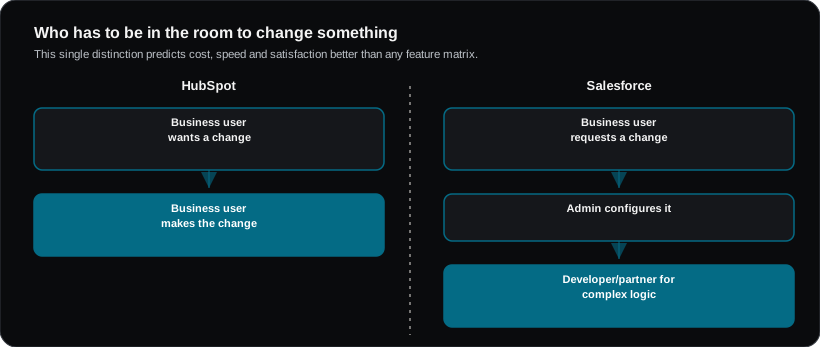
The genuine difference is who has to be in the room to change something.
- HubSpot is designed so a capable business user can build and change most things themselves.
- Salesforce is designed so almost anything is possible, but non-trivial change typically needs an admin, and eventually a developer or partner.
That single distinction predicts cost, speed and satisfaction better than any feature matrix.
Where each one fits
| HubSpot | Salesforce | |
|---|---|---|
| Sweet spot | Startups to upper mid-market; commercially-led teams | Mid-market to enterprise; complex or regulated operations |
| Time to first value | Weeks | Months |
| Who administers it | Often a marketing or revenue ops generalist | Usually a dedicated admin, at scale a team |
| Handles complex process | Up to a point, then it strains | Effectively unlimited |
| Ecosystem | Growing marketplace | Very large — AppExchange, thousands of apps and partners |
| Reporting | Good and accessible out of the box | Extremely powerful, more setup required |
| Customisation ceiling | Moderate | Essentially none |
| Typical hidden cost | Contact-tier pricing escalation | Implementation and admin salary |
Cost, honestly
Headline per-seat pricing misleads in both directions.
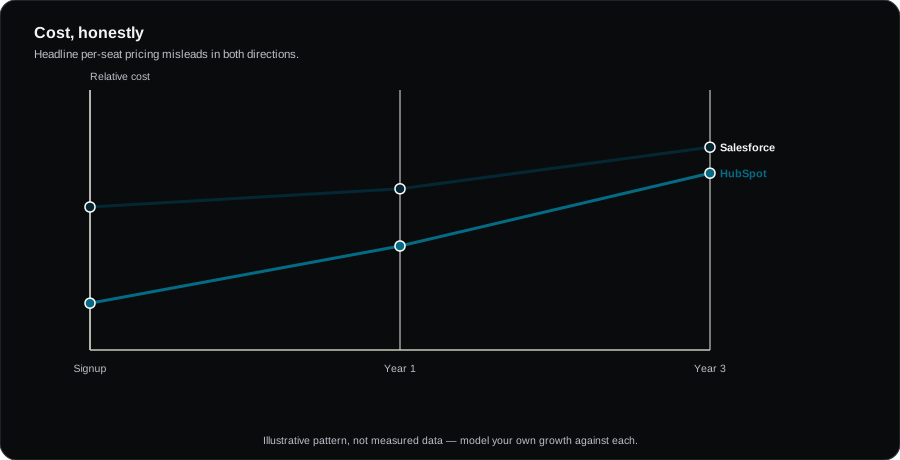
HubSpot: the seat price is only part of it. Marketing Hub pricing scales with marketing contact count, and costs can rise sharply as your database grows — often faster than headcount. Model this against your expected contact growth over three years, not today's list.
Salesforce: the licence is genuinely only the beginning. Budget realistically for implementation (frequently comparable to or exceeding first-year licence cost), an admin (whether hired or partner-retained), and add-ons — several capabilities that feel core are separately licensed.
A rough three-year total-cost rule that holds up reasonably well: HubSpot's cost is more predictable and rises with database size; Salesforce's cost is front-loaded and rises with complexity.
Choose HubSpot if
- You need to be operational this quarter
- Marketing and sales alignment is the primary problem
- Nobody on the team wants to become a platform administrator
- Your sales process is relatively standard
- You value being able to change things yourself without a ticket
Choose Salesforce if
- Your process genuinely is unusual — complex approvals, multi-entity, regulated workflows
- You have or will have dedicated administration capacity
- You need deep integration into ERP, finance or industry systems
- You are in financial services, health or another sector with a mature Salesforce industry cloud
- Scale is such that customisation ceilings would eventually bite
The honest failure modes
HubSpot goes wrong when a business outgrows it structurally — complex product configuration, deep quoting logic, multi-entity consolidation — and starts bolting on workarounds. The symptom is spreadsheets reappearing beside the CRM.
Salesforce goes wrong when it is bought for a simple process. Over-customised orgs that nobody understands, built by a partner who has left, with adoption problems because it takes eleven clicks to log a call. The symptom is reps not updating records.
Both failures are expensive. The second is more expensive.
Migration reality
Whichever way you move, the data is the work. Budget most of the project for deduplication, field mapping, historical activity, and deciding what not to bring. Migrating a decade of bad data faithfully is a common and costly error — it recreates your existing problems in a more expensive system.
Frequently asked questions
Can we start on HubSpot and move later?
Yes, and many companies do. It is a legitimate strategy: HubSpot now, migrate when complexity genuinely demands it. Just avoid building deep custom logic that will not port.
Is Salesforce overkill for 20 people?
Often, unless your process is genuinely complex or you are in a sector where the industry cloud does real work. Twenty people with a standard sales motion are usually better served elsewhere.
What about the AI features?
Both are shipping capable AI (Agentforce, Breeze). Neither should decide the platform choice today — the underlying fit questions above matter far more and will still matter in three years.