


They are not really the same kind of product
The comparison is usually framed as two chatbots. It is more useful to think of them as a reasoning tool and an integration layer.
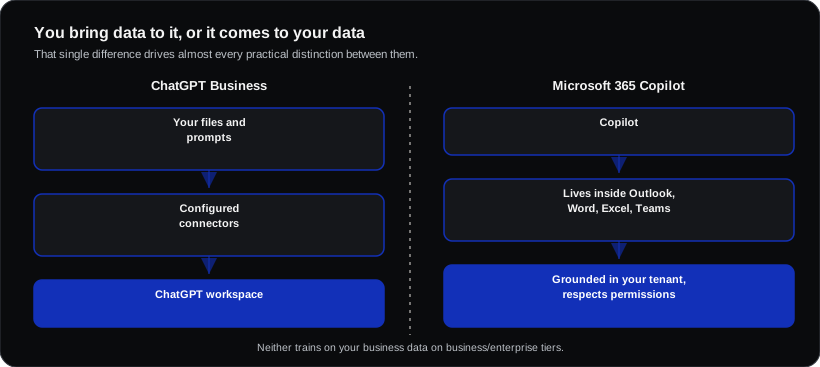
- ChatGPT Business gives your team access to OpenAI's models in a dedicated workspace, with shared prompts, projects and connectors you configure.
- Microsoft 365 Copilot embeds a model inside Outlook, Word, Excel, PowerPoint and Teams, with grounding in your organisation's own mail, files and meetings via Microsoft Graph.
That difference — whether the AI comes to your data or you bring data to the AI — drives almost every practical distinction below.
Head to head
| ChatGPT Business | Microsoft 365 Copilot | |
|---|---|---|
| Typical price | ~$20–25 per user/month | ~$18–21 per user/month on business plans; $30 add-on on enterprise agreements |
| Requires existing licence | No | Yes — a qualifying Microsoft 365 plan underneath |
| Sees your company email and files | Only via configured connectors | Yes, natively, respecting existing permissions |
| Inside Word, Excel, Outlook, Teams | No | Yes |
| Strength on open-ended reasoning and drafting | Excellent | Good |
| Excel and data manipulation | Strong analytically, but outside your files | In-file, though capability varies by task |
| Meeting summaries and recap | Via third-party tools | Built into Teams |
| Custom assistants | Custom GPTs, straightforward to build | Copilot Studio agents, more capable but more involved |
| Admin, DLP and compliance controls | Workspace-level controls | Inherits Purview, sensitivity labels and tenant policy |
| Trains on your business data | No, on business tiers | No |
Where each one genuinely wins
Choose Microsoft 365 Copilot when:
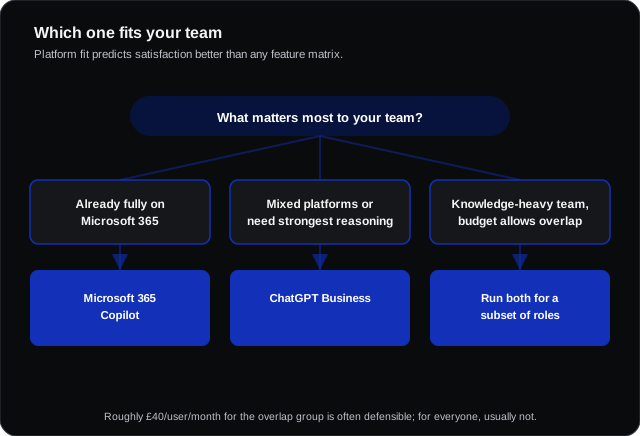
- You are already fully on Microsoft 365 — this is the single strongest predictor
- The valuable work is "summarise this thread", "find what we agreed", "draft from these documents"
- You have compliance requirements and want AI governed by the same DLP and sensitivity labels as everything else
- Meeting recap in Teams matters
- Permission-aware grounding matters — Copilot only surfaces what that user could already open
Choose ChatGPT Business when:
- You want the strongest general reasoning for analysis, strategy, complex drafting and coding help
- Your teams work across mixed platforms, or you are not on Microsoft 365
- You want to build and share custom assistants quickly without a platform project
- Non-Microsoft file and data workflows dominate
Run both when: you are a knowledge-heavy business where a subset of people (analysts, consultants, engineers, marketing) get disproportionate value from stronger reasoning, while everyone else benefits from in-app assistance. Roughly £40 per user per month for that overlap group is often defensible; for everyone it usually is not.
The cost detail that catches people out
Copilot's headline price is an add-on. If you are not already on a qualifying Microsoft 365 plan, the true per-seat cost includes that base licence — which is why "Copilot is cheaper" often stops being true for organisations that are not already Microsoft shops.
Conversely, if you are on Microsoft 365, a meaningful part of the value (Teams recap, Outlook summarisation) has no equivalent in a standalone tool without buying something else as well.
How to run a trial that actually tells you something
- Pick 8–12 people who do different jobs, not just the enthusiasts.
- Give it six weeks. Two is not enough — the first fortnight measures novelty.
- Define three concrete tasks up front with a current time baseline.
- Collect failures deliberately, not just wins. Where did it produce confident nonsense?
- Check the permission behaviour. With Copilot specifically, test whether it surfaces documents the user should not have had access to — that usually reveals pre-existing SharePoint permission problems rather than a Copilot fault, but it is much better to find it in a pilot.
That last point is the most common unpleasant surprise in Copilot deployments. Copilot respects existing permissions faithfully — which means it makes years of over-permissive file sharing suddenly very visible.
Frequently asked questions
Does either train on our data?
No, not on business and enterprise tiers. Both contractually exclude customer content from model training. Consumer tiers are a different matter entirely.
Which is better at writing?
ChatGPT is generally stronger on open-ended, complex or stylistically demanding drafting. Copilot is stronger when the task depends on your actual documents and correspondence, because it can see them.
Can we switch later?
Yes — neither creates meaningful lock-in at the assistant layer. The switching cost is retraining people and rebuilding any custom assistants, not data migration.
What about Claude or Gemini?
Both are credible. Gemini is bundled into Google Workspace plans, making it the obvious answer for Workspace organisations. Claude is strong on long-document analysis and careful reasoning. The platform-alignment logic in this article applies to them equally.