


The perimeter is the identity now
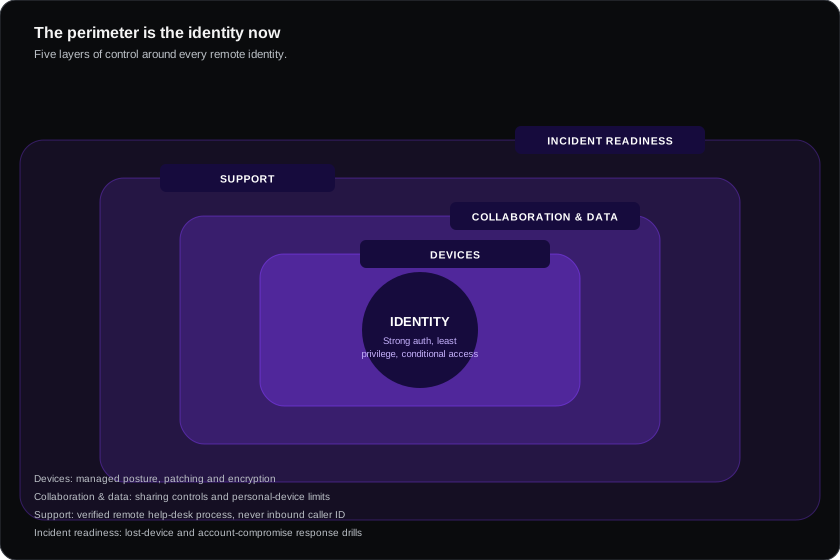
Remote work did not add a few new risks to the old model — it removed the model. When everyone was in an office, the network was the boundary. With a distributed workforce, the only consistent control point is who is signing in, from what device, to what.
Everything below follows from that. If you do only three things, do these:
- Phishing-resistant MFA on every account — no exceptions for executives
- Device health as a condition of access — an unmanaged laptop should not reach your data
- Fast offboarding — access removed in hours, not weeks
Priorities in order of return
| Control | Effort | Impact | Notes |
|---|---|---|---|
| MFA everywhere | Low | Very high | Prefer passkeys/FIDO2; SMS is the weakest form and is phishable |
| Single sign-on | Medium | Very high | One place to grant and revoke; makes offboarding real |
| Device management (MDM) | Medium | High | Encryption, patching, screen lock, remote wipe |
| Conditional access | Medium | High | Block legacy protocols, risky sign-ins, unmanaged devices |
| Patch discipline | Low | High | Unpatched endpoints remain a leading entry route |
| Endpoint detection (EDR) | Medium | High | Antivirus alone is insufficient |
| Backup with recovery testing | Medium | Very high | The actual ransomware control — untested backups are decoration |
| Password manager | Low | Medium | Removes reuse; makes strong credentials practical |
| Security awareness | Low | Medium | Focus on reporting culture, not annual click-through training |
| VPN | Medium | Low–medium | Largely superseded — see below |
The VPN misunderstanding
Many organisations still equate remote security with "connect to the VPN". If your applications are SaaS — Microsoft 365, Google Workspace, Salesforce — traffic goes to the internet regardless, and a VPN adds latency without adding protection.
VPN remains appropriate for reaching internal, non-internet-facing systems. For everything else, conditional access on identity plus device posture is the stronger and less annoying control. Users bypass slow VPNs; they cannot bypass a conditional access policy.
BYOD, decided properly
The unresolved BYOD position is one of the most common gaps. Pick a model deliberately:
| Model | How it works | Trade-off |
|---|---|---|
| Corporate devices only | Company issues and manages everything | Cleanest security, highest cost |
| Managed BYOD | Personal device enrolled in MDM | Cheaper; genuine privacy objections, and works council issues in Europe |
| Application protection only | Data controls inside apps; device unmanaged | Good middle ground — protects company data without managing the personal device |
| Unmanaged access | Anything can connect | Not a position, an absence of one |
For most European organisations, application-level protection is the pragmatic answer — it protects company data in company apps without asserting control over an employee's personal phone, which sidesteps both the privacy objection and the works council conversation.
The controls people skip
- Offboarding speed. Ex-employee accounts active weeks later is extremely common and entirely preventable with SSO.
- Shared and service accounts. Often no MFA, shared passwords, and no owner.
- OAuth app grants. Staff connect third-party apps to company data; nobody reviews them. Audit these — it is usually revealing.
- Home network and travel. Less critical than assumed if devices are hardened and traffic is encrypted, but public-network guidance is still worth stating.
- Physical security. Screen locks and encryption matter more when laptops travel.
For a small business without a security team
An honest minimum that genuinely reduces risk:
- Turn on MFA everywhere, preferring app-based or passkeys over SMS
- Use your existing platform's security features — Microsoft 365 Business Premium and Google Workspace include substantial capability most organisations never enable
- Enable device encryption and automatic updates
- Deploy a password manager
- Back up, and test a restore at least once
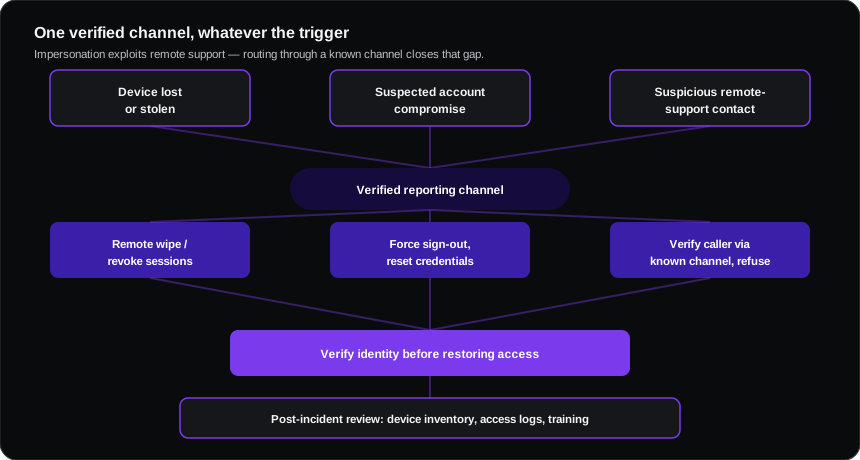
- Write and rehearse a three-page incident plan: who to call, what to do first, who tells customers
Point 2 is the cheapest win available. Most SMEs are already paying for controls they have not switched on.
Frequently asked questions
Is MFA enough on its own?
It is the highest-value single control, but MFA fatigue and adversary-in-the-middle phishing are real. Phishing-resistant methods (passkeys, FIDO2 security keys) close most of that gap.
Should we monitor remote employees?
Security monitoring of company systems, yes. Productivity surveillance is a different thing — legally fraught in Europe, likely to require works council consultation, and corrosive to trust. Keep the two clearly separate.
What about staff working from other countries?
It raises tax, employment and data protection questions well beyond security. Have a stated policy on where people may work from, and make sure HR and finance own it jointly with IT.