


Fix the friction, not the tooling
Remote teams have four specific frictions that co-located teams do not, and AI addresses them with very different degrees of success.
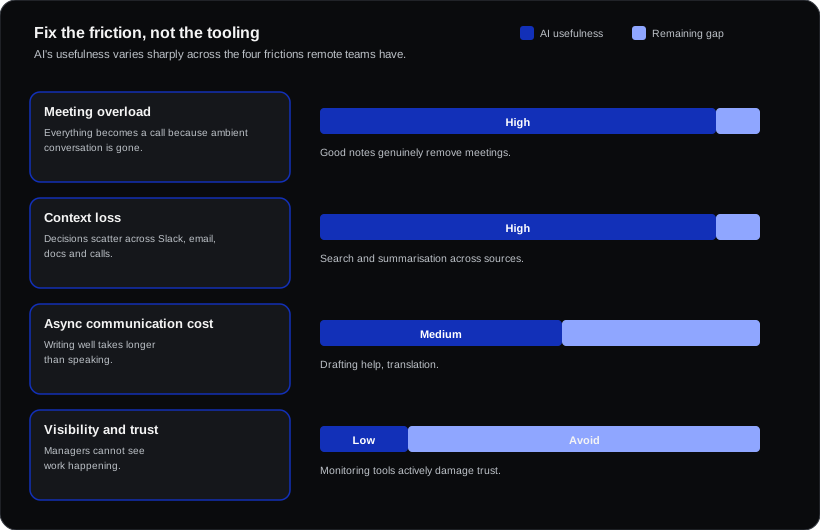
| Friction | Why remote makes it worse | AI's actual usefulness |
|---|---|---|
| Meeting overload | Everything becomes a call because ambient conversation is gone | High — good notes genuinely remove meetings |
| Context loss | Decisions scatter across Slack, email, docs and calls | High — search and summarisation across sources |
| Async communication cost | Writing well takes longer than speaking | Medium — drafting help, translation |
| Visibility and trust | Managers cannot see work happening | Low — and monitoring tools actively damage trust |
That last row matters. AI-driven employee monitoring is the one category to avoid: it is legally fraught in Europe, likely to require works council consultation, and reliably corrosive to the trust remote work depends on.
The stack that earns its cost
| Need | Tools | Price | Impact |
|---|---|---|---|
| Meeting notes + actions | Fathom, Fireflies, Teams recap, Meet/Gemini | £0–20/user | Highest — kills the "recap meeting" |
| Cross-tool search | Glean, Dashworks, Copilot, Gemini | £0–30/user | High in orgs above ~50 people |
| Writing and drafting | ChatGPT, Copilot, Claude, Gemini | £15–25/user | High |
| Project summarisation | Notion AI, Asana, Linear, ClickUp AI | Usually bundled | Medium |
| Translation | Built-in, DeepL | £0–8/user | High for multilingual European teams |
The single highest-return change
Record meetings, share structured notes, and stop inviting people "just to listen".
Remote teams over-invite because attendance is the only way to stay informed. Reliable, searchable notes remove that reason. Teams that do this properly typically cut meeting attendance materially without losing information flow — and it is the one change where the tooling cost is trivial and the time recovered is large.
Make it a norm, not a tool: notes shared in the channel within an hour, decisions and owners at the top, and explicit permission to skip a meeting you are only attending for awareness.
For distributed European teams specifically
Two considerations that do not apply elsewhere:
Recording consent. Several European countries require participant consent to record conversations, and works councils frequently have consultation rights over tools that record employees. Announce recordings, allow opt-out, and consult where required.
Language. Cross-border European teams default to English, which quietly disadvantages non-native speakers in fast synchronous discussion. AI helps here more than is usually credited: drafting assistance evens out written fluency differences, and good transcription lets people re-read what they missed in real time. That is a genuine inclusion benefit, not just efficiency.
What to avoid
- Monitoring and "productivity scoring". Legally risky in Europe, and it measures activity rather than output.
- Tool sprawl. Five AI tools with overlapping functions creates more context-switching than it removes.
- AI-generated status updates. If a status report can be generated without a human, nobody needed to read it. Delete the report instead.
- Replacing human contact entirely. Remote teams need some synchronous connection; automating away every conversation has a cost that shows up months later in retention.
A simple test before buying anything
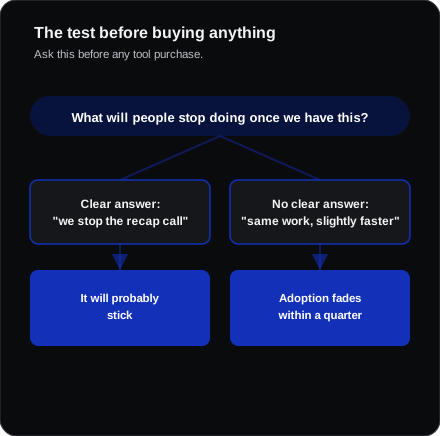
For any tool, ask: what will people stop doing once we have this?
If there is a clear answer — "we stop writing up meetings", "we stop the Monday recap call", "we stop searching four systems" — it will probably stick. If the answer is "nothing, they will do the same work slightly faster", adoption will fade within a quarter.
Frequently asked questions
How many AI tools does a remote team actually need?
Usually two: an assistant tied to your existing platform, and a meeting notes tool. Add search when the organisation is large enough that finding things is a genuine daily problem.
Does this work for teams across many time zones?
It helps disproportionately. Good notes and summaries are exactly what makes asynchronous handover viable across a large time-zone spread.
Is AI note-taking accurate enough to rely on?
For recall and actions, generally yes in major languages. For anything contested or contractual, treat it as an aid rather than a record — and test accuracy in each language your team actually uses.