


Where Copilot earns its licence, and where it does not
Microsoft 365 Copilot costs roughly £18–21 per user per month on business plans, on top of your existing licence. Whether that is good value depends almost entirely on which workflows you actually change.
Based on consistent patterns across deployments, the value distribution is uneven:
| Workflow | Value | Why |
|---|---|---|
| Teams meeting recap and action items | Very high | Removes real admin; works reliably |
| Email triage and thread summarisation | Very high | Long threads summarised accurately; biggest daily time saver |
| Finding information across your own files | High | Grounded in your content with permissions respected |
| First-draft documents from existing material | High | "Draft a proposal from these three documents" works well |
| PowerPoint generation | Medium | Good structure, design usually needs work |
| Excel analysis | Medium and improving | Strong on explaining and formulas; less reliable on complex modelling |
| Creative or brand-voice writing | Lower | Competent but generic without heavy prompting |
The pattern: Copilot is strongest where the answer lives in your own tenant. That grounding is the actual product, not the model.
Five workflows worth setting up deliberately
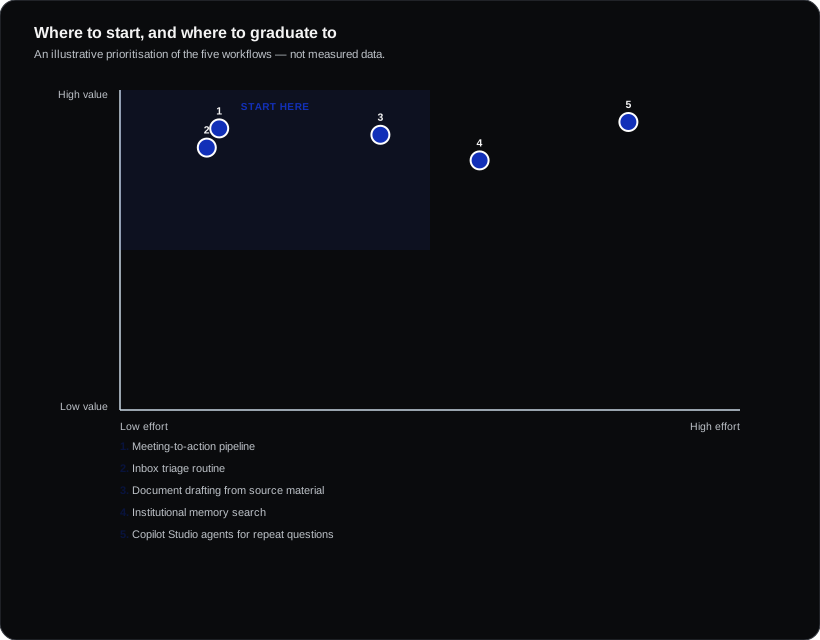
1. Meeting-to-action pipeline
Record meetings, let Copilot produce the recap, then have the organiser spend two minutes correcting owners and dates before sharing. The correction step matters — unreviewed AI action items go stale and people stop trusting them.
2. Inbox triage routine
Start the day with "summarise emails I haven't read, highlight anything needing a response today". Effective for anyone carrying a heavy inbox, and it is the workflow that converts sceptics fastest.
3. Document drafting from source material
The highest-quality use: point Copilot at three or four specific documents and ask for a structured draft. Far better output than asking it to write from nothing, because it is grounding rather than inventing.
4. Institutional memory search
"What did we agree with this client about scope?" across mail, files and Teams. Genuinely valuable in organisations with long-running client relationships and staff turnover.
5. Copilot Studio agents for repeated questions
For internal questions asked repeatedly — HR policy, IT how-to, expense rules — a Copilot Studio agent grounded in your documents deflects a meaningful volume of internal queries. This is where organisations move past assistance into automation.
Do this before you deploy
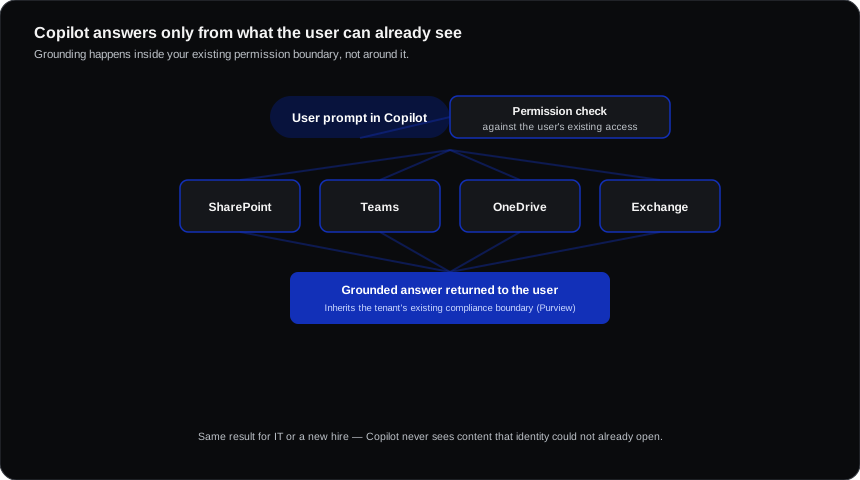
Audit your SharePoint and OneDrive permissions. This is the single most important preparation step, and skipping it is the most common source of Copilot regret.
Copilot respects permissions exactly — so anything shared with "everyone in the organisation", any over-broad site membership, and any forgotten open link becomes discoverable by search rather than merely technically accessible. Salary spreadsheets and unreleased plans surfacing in Copilot results is a recurring story, and it is a permissions problem that predates Copilot by years.
Run the sharing reports, fix the worst offenders, and consider restricted SharePoint search during the initial rollout.
Also worth doing first:
- Decide meeting recording policy, including consent and works council consultation in Europe
- Set retention for recordings and transcripts
- Identify pilot users across different roles, not just enthusiasts
Making adoption stick
Licence deployment is not adoption. The consistent pattern in successful rollouts:
- Train on specific workflows, not on features. "Here is how to run your Monday inbox" beats a tour of the interface.
- Name champions per team who share what worked.
- Set the expectation of verification. Copilot is confidently wrong sometimes; people need to hear that from you rather than discover it embarrassingly.
- Review licence usage at 60 days and reclaim from non-users. Copilot licences are expensive to leave idle.
Frequently asked questions
Does Copilot train on our data?
No. Commercial data is excluded from training, and Copilot operates within your tenant's compliance boundary, inheriting your existing controls.
Is it worth it for everyone or just some roles?
Value concentrates in meeting-heavy and email-heavy roles — management, sales, project delivery, client services. For roles that rarely touch documents or meetings, the return is weaker. Licensing selectively is entirely legitimate.
Do we need E5?
No. Copilot is available with Business Standard and Business Premium as well as enterprise plans. E5 adds broader security and compliance capability, not Copilot capability.